
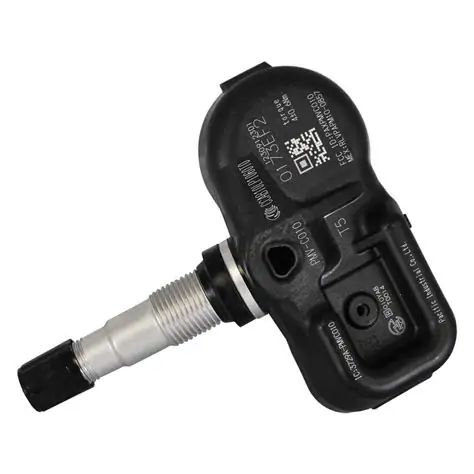
Learn about TPMS sensors, their importance in a 2012 Camry, signs of failure, and how to diagnose and replace them easily.In the realm of vehicle safety and maintenance, the Tire Pressure Monitoring System (TPMS) sensor plays a crucial role, particularly in models like the 2012 Toyota Camry. This innovative technology not only alerts drivers to potential tire issues but also helps maintain optimal fuel efficiency and handling. However, like any component, TPMS sensors can fail, leading to warning lights and potentially costly repairs. In this blog post, we’ll delve into what a TPMS sensor is, examine common signs of its failure, discuss its importance in your Camry, and guide you through diagnosing and replacing a faulty sensor. Whether you’re a seasoned DIY mechanic or a concerned car owner, this comprehensive guide will empower you to keep your vehicle safe and roadworthy. Let’s get started!
What is a TPMS sensor?
The Tire Pressure Monitoring System (TPMS) sensor is a vital component in modern vehicles, including the 2012 Toyota Camry. It monitors the air pressure in each tire and alerts the driver when any tire is significantly under-inflated or over-inflated. This system not only promotes better fuel efficiency but also enhances overall safety on the road.
TPMS sensors can be categorized into two main types:
- Direct TPMS: These sensors measure the actual tire pressure and send the data directly to the car’s onboard computer.
- Indirect TPMS: This system uses the vehicle’s ABS (Anti-lock Braking System) to infer tire pressure based on the rotational speed of each wheel.
Direct TPMS is more common in newer vehicles like the 2012 Camry, providing precise pressure readings and instant notifications if there’s an issue.
Understanding how the TPMS sensor works is crucial for any car owner. When a tire’s pressure drops below a certain threshold, the TPMS warning light on the dashboard illuminates, indicating that the driver should check the tire pressure.
Maintaining proper tire pressure is essential not only for the longevity of the tires but also for the vehicle’s performance, fuel consumption, and safety. In summary, the TPMS sensor plays a critical role in vehicle safety and efficiency by ensuring that tires are properly inflated and maintained.
Common signs of TPMS sensor failure
The *Tire Pressure Monitoring System (TPMS)* is an essential component of modern vehicles, including the *2012 Toyota Camry*. It is designed to monitor the air pressure in your tires and alert you when it falls below a safe level. However, like any other electronic component, the TPMS sensor can fail over time. Here are some common signs that indicate a *TPMS sensor failure*:
- Warning Light Activation: One of the most noticeable signs of a failing TPMS sensor is the illumination of the TPMS warning light on your dashboard. If this light is on, it indicates a problem with the sensor or tire pressure.
- Inaccurate Pressure Readings: If you notice that the displayed tire pressures do not match the actual pressures measured by a tire gauge, it could mean that the sensor is malfunctioning.
- Frequent Low Tire Pressure Alerts: Receiving continuous low tire pressure alerts, even when the tires are adequately inflated, can be a symptom of a faulty TPMS sensor.
- Slow Signal Response: If it takes longer than usual for the TPMS system to respond after inflation, it may be a sign of degraded sensor performance.
- Sensor Failure Messages: Some vehicles display specific error messages related to sensor failures. If your Camry shows messages like *TPMS Sensor Error,* this indicates that the system has detected an issue.
Addressing these signs early can help ensure your safety on the road. If you notice any of the symptoms listed above, it may be time to have your *TPMS sensor* checked or replaced.
Importance of TPMS sensor in a 2012 Camry
The Tire Pressure Monitoring System (TPMS) is a crucial safety feature in vehicles, including the 2012 Toyota Camry. This system helps monitor the air pressure in the tires and alerts the driver when the pressure falls below a safe level. Understanding the significance of the TPMS can enhance your driving experience and ensure safety on the road.
Here are some key reasons why the TPMS is particularly important in a 2012 Camry:
- Enhanced Safety: The TPMS actively monitors tire pressure, reducing the risk of tire blowouts and maintaining optimal traction. Proper tire pressure helps in maintaining control, especially during adverse weather conditions.
- Fuel Efficiency: Under-inflated tires can lead to increased rolling resistance, which in turn can decrease fuel efficiency. By ensuring that all tires are properly inflated, the TPMS can help in optimizing fuel consumption.
- Extended Tire Life: Maintaining correct tire pressure prolongs the life of the tires. The TPMS alerts drivers to any under-inflation, helping to avoid uneven wear and tear.
- Compliance with Regulations: Many regions have regulations requiring vehicles to be equipped with a functioning TPMS. A properly working TPMS in your 2012 Camry ensures compliance and avoids potential fines.
Furthermore, the 2012 Camry’s TPMS system provides additional convenience to drivers:
Proper tire maintenance not only enhances safety but also contributes to the vehicle’s overall performance and efficiency. – Automotive Expert
In summary, the TPMS sensor in your 2012 Camry is vital for ensuring safety, optimizing performance, and saving costs in the long run. Regularly checking the TPMS functionality and addressing any issues promptly can help maintain the integrity of your vehicle’s performance.
How to diagnose a faulty TPMS sensor
The Tire Pressure Monitoring System (TPMS) sensor in your 2012 Camry is a crucial component that ensures your tires are properly inflated. A faulty TPMS sensor can lead to improper tire pressure, affecting your vehicle’s safety and performance. Here are some steps to help you diagnose a faulty TPMS sensor:
1. Check the Dashboard Warning Light
One of the first indications of a possible TPMS issue is the dashboard warning light. If the TPMS warning light is illuminated, it may indicate that one or more tire pressures are either too high or too low. If the light stays on after adjusting tire pressures, further diagnosis is required.
2. Verify Tire Pressures
Before delving deeper, it’s essential to check all your tire pressures. Use a reliable tire pressure gauge to ensure that all tires are inflated to the recommended pressure found in the driver’s side door jamb. If the pressures are correct and the warning light remains on, the problem may lie with the sensor.
3. Inspect the Tires
Visually inspect each tire for any obvious damage, such as:
- Punctures
- Cracks
- Bulges
- Uneven wear
Damage to a tire can affect the TPMS, and addressing any issues may resolve the warning light.
4. Check the Sensor Activation
If the warning light is still on, you may need to check if the TPMS sensors are functioning correctly. Here’s how you can do that:
- Use a TPMS scanner to read the sensor signals.
- Check if the sensors communicate with the scanner. If they don’t, the sensor might be dead or malfunctioning.
- Test each sensor one by one and make a note of any that fail to respond.
5. Look for Interference
Sometimes, interference from electronic devices can cause TPMS issues. Ensure that there are no electronic gadgets or devices affecting the sensors. Turn off potentially conflicting devices and retest the TPMS system.
6. Reset the TPMS
If diagnostics point to a possible sensor issue but all seems well, consider reprogramming the TPMS. This process generally involves:
- Turning on the ignition without starting the engine
- Pressing the TPMS reset button (if equipped)
- Releasing the pressure on each tire and adding air as needed
7. Visit a Professional
If you’ve gone through these steps and are still unable to resolve the issue, it may be time to consult a professional mechanic. They will have the tools and expertise necessary to accurately diagnose and repair any TPMS-related problems.
Diagnosing a faulty TPMS sensor is vital for maintaining the safety and efficiency of your 2012 Camry. Regular monitori
Steps to replace a TPMS sensor in a 2012 Camry
The Tire Pressure Monitoring System (TPMS) is crucial for maintaining the safety and efficiency of your 2012 Camry. If you find that your TPMS sensor is malfunctioning, replacing it is essential to ensure accurate tire pressure readings. Here are the steps to replace a TPMS sensor in your 2012 Camry:
Tools and Materials Needed
- New TPMS sensor
- Tire pressure gauge
- Tire iron
- Jack and jack stands
- Torque wrench
- Scanner tool (for initial setup)
Step-by-Step Guide
- Ensure Safety: Park your vehicle on a flat surface and engage the parking brake to prevent movement.
- Remove the Wheel: Loosen the lug nuts using the tire iron, then lift the car with the jack and secure it with jack stands. Remove the lug nuts entirely and take off the wheel.
- Locate the TPMS Sensor: The TPMS sensor is located inside the tire, mounted on the valve stem. You may need to deflate the tire slightly to access it.
- Remove the Old Sensor: Using a wrench, unscrew the valve stem nut to disconnect the old TPMS sensor from the valve. Be cautious as you detach it to avoid damaging the valve stem.
- Install the New Sensor: Attach the new TPMS sensor to the valve stem. Make sure it’s securely fastened, and then inflate the tire to the recommended pressure.
- Reattach the Wheel: Place the wheel back onto the hub, screw on the lug nuts by hand, and then use a torque wrench to tighten them to the manufacturer’s specifications.
- Repeat for Other Tires: If you’re replacing multiple sensors, repeat the above steps for each tire.
- Reset the TPMS System: Once all sensors are installed, use a scanner tool to reset the TPMS system. This will ensure that the new sensors are synchronized with your vehicle’s system.
- Test the System: Start your vehicle and check for any warning lights on the dashboard. Take a short drive to confirm that the TPMS is functioning correctly.
Final Thoughts
Replacing a TPMS sensor in your 2012 Camry can improve your vehicle’s performance and safety. Following these steps will help ensure that your TPMS system operates smoothly. If you’re unsure or uncomfortable performing these
Frequently Asked Questions
What is TPMS and why is it important for a 2012 Camry?
TPMS stands for Tire Pressure Monitoring System. It’s crucial for alerting the driver when tire pressure is too low, which can lead to decreased fuel efficiency, increased tire wear, and safety hazards.
How can I tell if my 2012 Camry’s TPMS sensor is malfunctioning?
A malfunctioning TPMS sensor may display a warning light on the dashboard, or you might notice inconsistent tire pressure readings compared to a manual gauge.
What is the procedure for resetting the TPMS on a 2012 Camry?
To reset the TPMS, turn the ignition to ‘On’ without starting the engine, press and hold the TPMS reset button until the light blinks three times, then release it. Finally, start the engine and drive for a few minutes.
Can I replace the TPMS sensor myself on a 2012 Camry?
Yes, you can replace the TPMS sensor yourself if you have the necessary tools and knowledge, but it’s recommended to consult a professional to ensure proper installation and functionality.
What are typical symptoms of a failing TPMS sensor in a 2012 Camry?
Typical symptoms include a continuously illuminated TPMS warning light, inconsistent pressure readings, or false alerts indicating low tire pressure.
How often should I check the TPMS system on my 2012 Camry?
It’s advisable to check the TPMS system regularly, ideally every month, as part of your routine vehicle maintenance to ensure your tires are always properly inflated.
What should I do if my TPMS light remains on after resetting?
If the TPMS light stays on after resetting, it could indicate a malfunctioning sensor or an issue with one of the tires. In this case, it’s best to have the system checked by a qualified technician.