
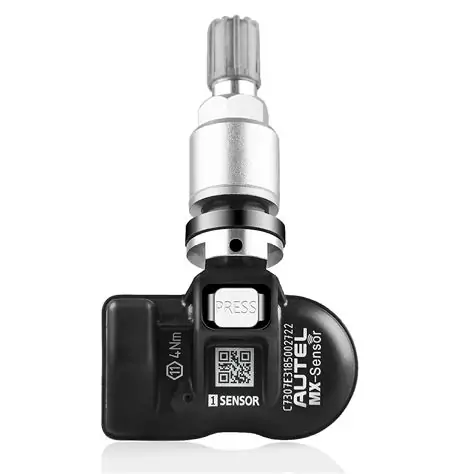
Discover how to understand, program, and properly utilize Auto TPMS sensors for enhanced vehicle safety and performance with our comprehensive guide.Welcome to our comprehensive guide on how to program Autel TPMS sensors! As modern vehicles become increasingly sophisticated, understanding the intricacies of Tire Pressure Monitoring Systems (TPMS) is essential for both car enthusiasts and everyday drivers. Autel TPMS sensors play a vital role in ensuring your vehicle’s safety and performance, providing real-time feedback on tire conditions. In this blog post, we will delve into the fundamentals of auto TPMS sensors, discuss the programming process and the tools you’ll need, and provide you with a step-by-step guide to successfully program your sensors. Additionally, we’ll explore the benefits of properly programmed TPMS sensors, emphasizing their significance for maintaining optimal tire health and enhancing vehicle safety. Whether you’re a DIY mechanic or a seasoned technician, this post will equip you with the knowledge to tackle TPMS sensor programming with confidence.
Understanding Auto TPMS Sensors
TPMS, or Tire Pressure Monitoring System, is an essential safety feature in modern vehicles that monitors the air pressure in tires. Understanding how auto TPMS sensors work is crucial for proper vehicle maintenance and safety on the road.
Types of TPMS sensors can be classified into two main categories:
| Type | Description |
|---|---|
| Direct TPMS | These sensors are mounted directly on the valve stem of each tire and measure the actual air pressure. They communicate this data directly to the vehicle’s onboard computer. |
| Indirect TPMS | These sensors do not measure tire pressure directly. Instead, they use the vehicle’s ABS (Anti-lock Braking System) sensors to estimate tire pressure based on wheel speed and diameter changes. |
Each type of sensor has its advantages:
- Direct TPMS: Provides precise pressure readings and alerts for individual tires.
- Indirect TPMS: Generally less expensive and easier to install, but may not provide specific tire information.
Understanding the operation of these sensors is vital for diagnosing issues such as:
Low tire pressure alerts, slow leaks, or sensor malfunctions that can affect vehicle handling and safety.
Many modern vehicles come equipped with a TPMS light on the dashboard that warns the driver about low pressure or sensor errors, enhancing overall road safety.
Programming Auto TPMS Sensors
Programming Auto TPMS Sensors is a crucial task for vehicle maintenance, ensuring that tire pressure monitoring systems function correctly to enhance safety and performance. It’s important to understand the specific steps involved in programming these sensors to make sure they operate as intended.
Understanding TPMS Sensors
TPMS (Tire Pressure Monitoring System) sensors play a critical role in monitoring the air pressure of the tires. They alert the driver when tire pressure falls below a certain level, which helps prevent accidents caused by flat tires or blowouts. The programming of these sensors is necessary after installation or when replacing tires.
Steps to Program Auto TPMS Sensors
- Gather Required Tools: Ensure you have the necessary tools, including a TPMS diagnostic tool and the correct Autel TPMS sensor model.
- Identify Vehicle Specifications: Check the vehicle’s specifications to determine the correct TPMS protocols.
- Program the Sensors: Follow the specific programming instructions provided with the Autel TPMS sensor. This may involve entering vehicle details and using the diagnostic tool to sync the sensors with the vehicle.
- Test the System: Once programmed, test the system by starting the vehicle and monitoring if the TPMS warning light goes off.
Important Considerations
- Make sure the vehicle is in a safe location while programming.
- Check for any existing fault codes that may affect sensor operation.
- Follow the manufacturer’s guidelines for compatibility and programming.
Common Programming Methods
There are several methods to program Auto TPMS Sensors, including:
| Method | Description |
|---|---|
| Tool-Based Programming | Using a diagnostic tool like the Autel TPMS tool to program sensors directly. |
| Manual Programming | Manually inputting the sensor ID and following the specific reset procedure outlined in the vehicle manual. |
| Automatic Programming | Some newer vehicles have the ability to auto-learn the sensor data without additional input. |
“Proper programming of TPMS sensors not only promotes safety but also enhances the longevity of your tires.”
By understanding how to program your Auto TPMS Sensors properly, you can contribute to the overall efficiency and safety of your vehicle. With the right tools and a clear process, you can manage this important aspect of vehicle maintenance effectively.
Tools Needed for TPMS Sensor Programming
Programming TPMS (Tire Pressure Monitoring System) sensors is a crucial part of ensuring vehicle safety and efficiency. To accomplish this task effectively, you’ll need the right tools at your disposal. Below is a list of essential tools required for the programming of TPMS sensors:
| Tool | Description |
|---|---|
| TPMS Tool/Scanner | A specialized device that communicates with the vehicle’s TPMS system, allowing for sensor programming, registration, and diagnostics. |
| OBDII Scanner | This tool reads diagnostic trouble codes and can help in programming the TPMS sensors by connecting to the vehicle’s onboard computer. |
| Battery Tester | A device to check the health of the TPMS sensor battery, ensuring it is not the source of any issues. |
| Valve Stem Tool | A tool specifically designed to remove and replace valve stems when installing or servicing TPMS sensors. |
| Torque Wrench | This ensures that the TPMS sensor and valve stem are installed to the manufacturer’s specifications to prevent leaks. |
In addition to these tools, ensure that you have a reliable vehicle-specific TPMS programming guide or software, as different vehicles may have unique procedures for programming TPMS sensors. Having the right tools not only simplifies the process but also enhances the accuracy and efficiency of sensor programming.
By preparing adequately with these essential tools, you’ll be well-equipped to tackle the task of programming Autel TPMS sensors or any other brand with ease.
Step-by-Step Guide to TPMS Sensor Programming
Programming TPMS (Tire Pressure Monitoring System) sensors is a crucial process that ensures the proper functioning of your vehicle’s tire pressure system. Below is a step-by-step guide to help you effectively program your Autel TPMS sensor.
Step 1: Gather Required Tools
Before starting the programming, make sure you have the following tools:
- Autel TPMS Programming Tool
- Vehicle Owner’s Manual
- TPMS Sensors (ensure they are compatible with your vehicle)
- Basic Hand Tools to remove tires if necessary
Step 2: Access the Vehicle’s OBD II Port
Connect your Autel TPMS tool to the vehicle’s OBD II port. This port is usually located beneath the dashboard near the driver’s seat.
Step 3: Turn on the Ignition
Switch on the vehicle ignition without starting the engine. This will power up the TPMS tool.
Step 4: Select the Vehicle Information
Using the Autel tool, navigate through the menu to select the correct vehicle make, model, and year. This step is essential for ensuring the tool communicates correctly with the TPMS system.
Step 5: Read Existing Sensor Data
Before programming new sensors, it’s advisable to read the existing sensor data. This allows you to verify the current system status and helps with troubleshooting if necessary. Look for a Read option on your TPMS tool.
Step 6: Program New Sensors
Once you’ve completed the previous steps, you can begin to program your new TPMS sensors:
- Select the Programming option on your TPMS tool.
- Follow the prompts to enter each tire’s sensor ID. You may have to remove each tire or use a service tool to trigger the sensors if required.
- Confirm the details and complete the programming process.
Step 7: Verify Successful Programming
After programming, check for any error codes on the TPMS tool. You should also test drive the vehicle to ensure that the sensors are functioning correctly. Keep an eye on the dashboard for any warning lights associated with the TPMS.
Step 8: Reinstall Tires (if removed)
If you had to remove the tires for access, make sure to reinstall them back correctly. Check the tire pressure to ensure everything is within the manufacturer’s specifications.
Conclusion
Following this step-by-step guide will help you program your Autel TPMS sensor with ease and precision, keeping your vehicle’s tire system fully functional and safe.
Benefits of Properly Programmed TPMS Sensors
One of the essential components of modern vehicles is the Tire Pressure Monitoring System (TPMS). Properly programmed TPMS sensors can offer various benefits, enhancing both safety and vehicle performance. Here are some key advantages:
- Improved Safety: A properly functioning TPMS alerts drivers of low or high tire pressure, reducing the risk of tire blowouts and improving overall road safety.
- Enhanced Fuel Efficiency: Maintaining the correct tire pressure can contribute to better fuel efficiency. Properly programmed sensors help ensure that your tires are always inflated to the recommended pressure, leading to lower fuel costs.
- Longer Tire Life: Consistently monitored and maintained tire pressure extends the life of your tires. Properly programmed TPMS sensors enable early detection of pressure issues, preventing uneven wear and unnecessary replacements.
- Better Handling and Performance: Correct tire pressure ensures optimal vehicle handling, improving traction and stability. Properly programmed TPMS sensors help maintain balanced tire pressure, enhancing overall driving performance.
- Regulatory Compliance: Many regions have regulations regarding tire safety. Properly programmed TPMS sensors assist vehicle owners in adhering to these regulations, avoiding potential fines and ensuring vehicle legality.
In summary, investing time and resources into properly programming your TPMS sensors is crucial. Not only does it enhance safety, but it also contributes to improved fuel efficiency, longer tire life, better vehicle performance, and compliance with safety regulations.
Frequently Asked Questions
What is the first step to program an Autel TPMS sensor?
The first step is to ensure that your vehicle’s ignition is in the ‘ON’ position without starting the engine.
Do I need any specific tools to program the TPMS sensor?
Yes, you will need an Autel TPMS programming tool or a compatible OBDII scanner that supports TPMS functions.
Can I use the Autel tool for any vehicle make and model?
The Autel TPMS tool is compatible with most make and models, but always check the tool’s compatibility list to confirm.
How do I identify the TPMS sensor type that I need?
You can refer to the vehicle’s owner manual or check online resources specific to your vehicle to find the correct TPMS sensor type.
What happens if the sensor is not programmed correctly?
If the sensor is not programmed correctly, the TPMS warning light may remain illuminated on your dashboard.
Is it necessary to reset the TPMS after replacing a sensor?
Yes, after replacing a TPMS sensor, you typically need to reset the system to ensure that the new sensor is recognized by the vehicle.
Where can I find detailed instructions for programming TPMS sensors?
Detailed instructions can usually be found in the Autel user manual, or you can refer to online tutorials specific to your TPMS programming tool.