
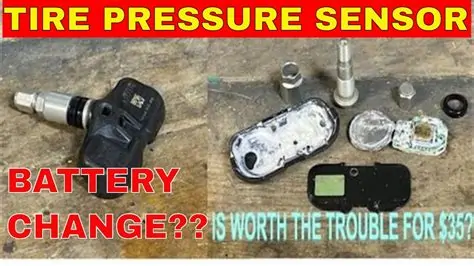
Learn how to understand, program, and test TPMS sensors for Toyota with our step-by-step guide and essential tools for efficient programming.When it comes to maintaining your Toyota’s safety and performance, understanding and managing your Tire Pressure Monitoring System (TPMS) is crucial. TPMS sensors are designed to provide real-time information about tire pressure, helping prevent potential hazards associated with under-inflation. However, there may come a time when you need to program or recalibrate these sensors, especially after tire changes or rotations. In this blog post, we will explore the essentials of TPMS sensors, guide you through the programming process specific to Toyota vehicles, and introduce the tools necessary for successful sensor management. With our step-by-step guide, you’ll learn how to ensure your TPMS is functioning properly, allowing you to drive confidently knowing your tires are in optimal condition. Let’s dive into the world of TPMS programming and equip you with the knowledge you need for a safer drive.
Understanding TPMS Sensors
Tire Pressure Monitoring System (TPMS) sensors are crucial components in modern vehicles, designed to monitor the air pressure in tires. By doing so, they help ensure optimal performance and safety on the road. Understanding these sensors is essential for both vehicle maintenance and tire health.
TPMS sensors come in two primary types: direct TPMS and indirect TPMS.
| Type | Description | Advantages | Disadvantages |
|---|---|---|---|
| Direct TPMS | Measures the actual tire pressure using sensors in each tire. |
|
|
| Indirect TPMS | Measures tire pressure indirectly through the vehicle’s ABS (Anti-lock Braking System) by comparing wheel speed. |
|
|
Regular maintenance and monitoring of TPMS sensors can extend their lifecycle and ensure that they function properly, providing peace of mind while driving. Familiarity with how these systems operate, as well as understanding the implications of warning signals, can prevent tire-related accidents and enhance overall vehicle safety.
Every driver should also be aware of the importance of programming TPMS sensors. In cases where tires are replaced or new sensors are added, reprogramming ensures that the system accurately reflects the current setup, helping maintain safety and performance on the road.
Programming TPMS Sensors for Toyota
Programming the TPMS (Tire Pressure Monitoring System) sensors for your Toyota vehicle is crucial for ensuring safety, optimal tire performance, and overall driving enjoyment. Here’s a guide to help you understand and execute the programming process effectively.
Understanding TPMS Sensors
The TPMS sensors are designed to monitor the air pressure in your tires and alert you when the pressure falls below a certain threshold. Each sensor transmits data to the vehicle’s onboard computer, which displays warning lights or messages on the dashboard when there’s an issue.
Tools Needed for Programming TPMS Sensors
Before you proceed with programming, ensure you have the following tools:
- TPMS Programming Tool: A compatible TPMS scanner or tool is essential for reprogramming sensors.
- Vehicle’s Owner Manual: Useful for referencing specific programming instructions for your Toyota model.
- New TPMS Sensors: Ensure you have the correct sensors compatible with your vehicle.
- Padlock or Tire Pressure Gauge: For checking and adjusting tire pressure during setup.
Step-by-Step TPMS Sensor Programming Guide
- Prepare Your Vehicle: Park your Toyota on a level surface and turn off the ignition.
- Connect TPMS Tool: Plug in the TPMS programming tool to the OBD-II port of your vehicle.
- Turn On the Ignition: Without starting the engine, turn the ignition to the ON position.
- Read Existing Sensor IDs: Use the tool to read the existing TPMS sensor IDs; note them down for reference.
- Install New Sensors: Replace old sensors with new ones; ensure they are properly seated on the tire valve stems.
- Activate Sensors: Follow the prompts on your TPMS tool to activate the new sensors. This may involve placing the tool near each tire or using a trigger mechanism.
- Program Sensor IDs: Input the new sensor IDs into the vehicle’s system using the TPMS tool.
- Check Tire Pressure: Ensure all tires are inflated to the manufacturer’s recommended pressure.
- Verify Programming: Use the TPMS tool to verify that all sensors are recognized by the vehicle.
Testing and Verifying TPMS Sensor Programming
Once you have completed the programming process, it’s essential to test the system:
- Drive the vehicle at a speed of at least 15 mph for several minutes. This will allow the sensors to communicate with the onboard computer.
- Check the dashboard for any warning lights. If the TPMS light remains on, recheck your programming.
- Re-scan the sensors with your programming tool to ensure all IDs are recognized correctly.
By following the above steps, you can successfully program TPMS sensors for your Toyota vehicle, enhancing safety and performance on the road.
Tools for TPMS Sensor Programming
Programming TPMS sensors is a crucial aspect of maintaining the safety and performance of your vehicle’s tire pressure monitoring system. To do this effectively, you need the right tools. Below, we’ve outlined some essential tools that are commonly used for TPMS sensor programming on Toyota vehicles.
Essential Tools for TPMS Sensor Programming
- TPMS Diagnostic Tool: This is the most important tool you’ll need. These tools can read, program, and reset TPMS sensors. Some popular brands include:
- TPMS Sensor Activation Tool: This device is used to activate the TPMS sensors once they are installed or replaced. It helps in syncing new sensors with the vehicle’s system.
- OBD-II Scanner: An OBD-II scanner helps retrieve diagnostic trouble codes and can reset the vehicle’s TPMS warning light. It’s crucial for troubleshooting any existing issues.
- Torque Wrench: Using a torque wrench is important to ensure that the sensors are installed with the correct torque specification. This prevents damage to the sensors and ensures reliability.
- Battery Replacement Tool: Many TPMS sensors have a battery that needs to be replaced periodically. A battery replacement tool will assist in safely opening the sensor housing without damage.
- Tech Support & Reference Materials: Having access to professional tech support and reference materials, such as service manuals or online forums, can significantly aid in troubleshooting and programming processes.
| Brand | Features |
|---|---|
| Autel | Comprehensive vehicle coverage, easy-to-use interface |
| Launch | Advanced programming options, high compatibility |
| SPX/OTC | Reliable performance and functionality for Toyota vehicles |
Using the right tools not only streamlines the TPMS sensor programming process but also improves the accuracy and lifespan of your TPMS sensors. Always refer to the vehicle-specific manuals for detailed instructions on programming and sensor installation.
Step-by-Step TPMS Sensor Programming Guide
Programming the TPMS (Tire Pressure Monitoring System) sensors for your Toyota vehicle is a crucial task that ensures safety and efficiency. Follow this detailed step-by-step guide to successfully program your TPMS sensors.
Tools Required
- TPMS Programmer Tool
- Passenger Vehicle OBD II Scanner
- Vehicle Owner’s Manual
- New TPMS Sensors
Step 1: Preparation
Before starting the programming process, make sure that the vehicle is parked on a flat surface and that the ignition is turned off. Gather all necessary tools and new TPMS sensors.
Step 2: Access the TPMS Programming Mode
- Insert the key into the ignition and turn it to the ON position without starting the engine.
- To enter the TPMS programming mode, press the brake pedal three times, and then turn the ignition to OFF.
Step 3: Install New TPMS Sensors
Remove the tires if necessary to access the valve stem where the TPMS sensor is located. Replace the old sensors with the new ones, making sure they are mounted properly.
Step 4: Program the New Sensors
- Once the new sensors are installed, restart the vehicle.
- Use the TPMS programmer tool and connect it to the vehicle’s OBD II port.
- Follow the tool’s prompts to initiate the programming sequence. This typically involves selecting the make, model, and year of the Toyota vehicle.
Step 5: Confirm the Programming
After programming, the tool will provide a confirmation message. Additionally, check the TPMS warning light on the dashboard. If it remains lit, it indicates that the programming was unsuccessful and might require repeating the process.
Step 6: Test the System
Once confirmed, test drive the vehicle for a short distance (usually around 10 minutes) to allow the system to recalibrate. Monitor the pressure readings via the dashboard display to ensure they are accurate.
By following these steps, you can effectively program your Toyota’s TPMS sensors, maintaining optimal tire pressure and enhancing road safety.
Testing and Verifying TPMS Sensor Programming
Once you have successfully programmed the TPMS sensors for your Toyota vehicle, it is crucial to test and verify that they function correctly. Proper verification ensures that the tire pressure monitoring system is properly calibrated and will alert you to any potential issues. Here are the steps to effectively test and verify your programmed TPMS sensors:
1. Use a TPMS Tool
Utilizing a professional TPMS tool is essential for checking the programming status of your sensors. Follow these steps:
- Connect the TPMS tool to the OBDII connector of your Toyota.
- Select the option to read or diagnose TPMS sensors.
- Check the tool’s display to confirm that all sensors are recognized and report their current pressure readings.
2. Manual Tire Pressure Check
It’s always wise to manually check the tire pressure using a digital pressure gauge after programming. Here’s how:
- Remove the valve stem caps from each tire.
- Press the pressure gauge onto the valve stem and check the reading.
- Compare the manual readings to the values displayed on the TPMS tool.
3. Monitor the TPMS Warning Light
After programming the sensors, the TPMS warning light on your dashboard should function correctly:
- If the light blinks, it indicates a malfunction with the system or one of the sensors.
- If the light remains illuminated, it means that the tire pressure is low or that the sensors are not properly programmed.
- A steady light after programming often signals successful installation.
4. Road Test
To ensure that everything is functioning as intended, take the vehicle for a short drive:
- Drive at a moderate speed for about 10-15 minutes.
- Pay attention to the dashboard for any warning lights.
- Check if the system accurately alerts you of any tire pressure variations.
5. Reprogram if Necessary
If you find discrepancies during the testing phase, you may need to reprogram the TPMS sensors. Anomalies can occur due to:
- Improper sensor placement.
- Compatibility issues with the vehicle’s system.
Follow the manufacturer’s guidelines to revisit the programming process if required.
Verifying the TPMS sensor programming is essential for optimal vehicle performance and safety. By following these steps, you can ensure that your Toyota’s tire pressure monitoring system is in working order and ready to keep you informed about your vehicle’s tire health.
Frequently Asked Questions
What is a TPMS sensor?
TPMS stands for Tire Pressure Monitoring System. It is a safety feature in vehicles that monitors the air pressure in tires.
Why is programming TPMS sensors important?
Programming TPMS sensors is essential to ensure that the vehicle’s onboard computer accurately receives and displays tire pressure information, which is crucial for safe driving.
What tools are needed to program TPMS sensors on a Toyota?
Typically, you will need a TPMS tool that is compatible with Toyota vehicles, along with an OBD-II scanner for some models.
Can I program TPMS sensors myself?
Yes, many TPMS sensors can be programmed at home using the proper tools and following the manufacturer’s instructions. However, some may require professional equipment.
How do I know if my TPMS sensors need programming?
If the TPMS warning light on your dashboard is illuminated despite correct tire pressure, it may indicate that the sensors need programming or recalibration.
What are the common steps to program TPMS sensors in a Toyota?
Generally, the steps include connecting the TPMS tool to the vehicle, turning on the ignition, selecting the programming function, and following prompts to synchronize the sensors.
Where can I find more detailed instructions for programming TPMS sensors in my specific Toyota model?
You can refer to the owner’s manual, consult a Toyota dealership, or visit automotive forums dedicated to your specific model for detailed instructions.